How to download order specific data and documents

Introduction

This user guide explains how to download CAD DRC rules, production data files and associated documents for a specific order from your Eurocircuits customer account.

The data and documents that can be downloaded are as detailed below.

From your Shopping basket
Section Description File type
Customer uploaded data Basket item ZIP
Customer uploaded data BOM CSV
Customer uploaded data CPL (if uploaded as a file) CSV
Administrative documents Data feedback history PDF
Administrative documents Offers PDF
CAD board setup files Altium CAD design rule & stackup (buildup) ZIP
From View running orders or Order repeats/view history
Section Description File type
Customer uploaded data Basket item ZIP
Customer uploaded data BOM CSV
Customer uploaded data CPL (if uploaded as a file) CSV
Administrative documents Data feedback history PDF
Administrative documents Offers PDF
Administrative documents Order confirmation PDF
Administrative documents PCB passport PDF
Production data Production Board data (DPF or Gerber) ZIP
Production data Production BOM data CSV
Production data Production CPL data CSV
Production data Solder paste data ZIP
CAD board setup files Altium CAD design rule & stackup (buildup) ZIP
NOTE
  • The actual data and documents that are available to download depends upon the status of your order.

How to download

To download the required files and data please follow the steps below.

First please Sign In to your customer account.

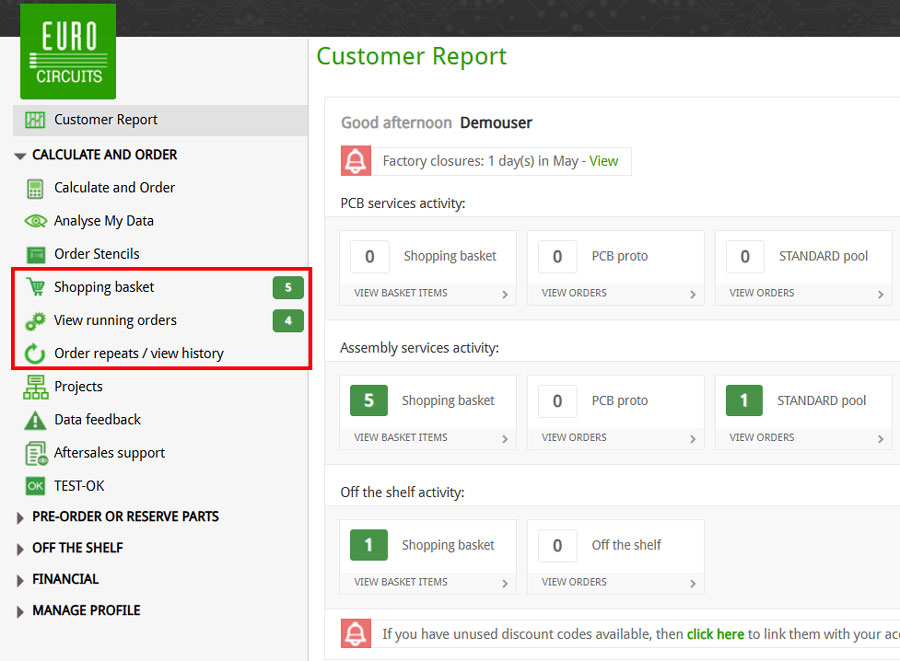
From the CALCULATE AND ORDER menu (on the left), select one of the following sub-menu items based on what you want to download (see tables above):

  • Shopping basket
  • View running orders
  • Order repeats/view history

Select required sub-menu from Calculate and Order menu


Click on the box beside the Basket item/Order No. you wish to download the data/files for and then click on the Downloads button from the top menu.
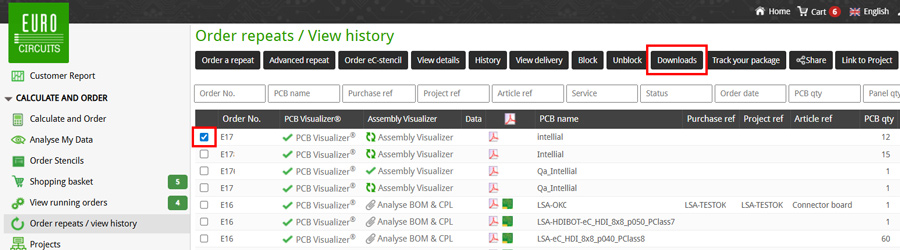
 

Select Item and Click Downloads Button


This will open the Downloads pop-up window showing all the available files that can be downloaded.
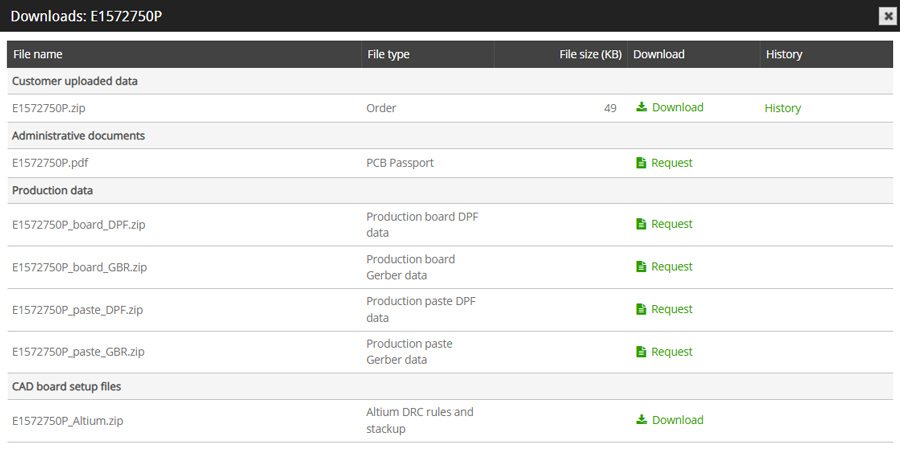
 

Downloads popup window


To download a specific file simply click on the word download icon Download in the Download column and the file will be saved to your computer.

Repeat this for every file you wish to download.

NOTE

If the word download request icon Request is in the Download column and want to download this file, then please click on this to download request icon Request and the file and it will be made available as soon as possible.


See also:

Altium Designer templates with Eurocircuits design rules

Other ways to find help

Technical Guidelines

Our Technical guidelines offer information and best practices on various aspects of PCB manufacturing and assembly, helping you understand the processes and requirements to ensure your PCB design is suitable for manufacturing.
View all 14 technical guidelines

Glossary

To simplify communication Eurocircuits uses abbreviations for many of these technical terms. Most of the technical terms and abbreviations are international standards in the Printed Circuit Board manufacturing industry. However to make it clear to everyone involved, we here present a list of technical terms and abbreviations along with their explanation.
View our glossary

Still need help?

Talk to our customer support via our online chat, telephone or email.
Contact us